Getting started
This guide starts from a DSH with dsh-mnemon installed and ends with memory that a conversation actually uses. It keeps the defaults: the Memory System in the sidebar, global storage and the Layered strategy. You do not need to know about Views or Strategies for everyday use.
First time? Start with Install and start: from installing Node.js to installing and enabling dsh-mnemon on the Plugins page and your first memory, with a screenshot for every step. Already installed? Jump to Open the Memory System. Upgrading? Follow compatibility and upgrades.
1. Install and upgrade from the command line
This section is for command-line users and also covers development checkouts, cloud access and Headless. You need:
- DSH
0.2.0-rc.2(npmlatestandnext) or0.1.7-rc.2, Node.js^22.19.0 || >=24.0.0, and pnpm; - a DSH model route that can create independent task Agents;
- for Mnemon Native only, a local
mnemonCLI; Install and start covers each platform. The other Providers connect to their own services.
Install and check DSH:
npm install -g @deepseek-ai/dsh
dsh --version
npm view @deepseek-ai/dsh dist-tags
The Starter pins a tested combination of the official plugins; the compatibility matrix lists it. Mnemon's Node 20 entry checks do not establish full Host compatibility.
How task Agents are started
Semantic work prefers a DSH provider named spawn with toolFilter, persona and depthLimit. Mnemon keeps one stable mnemon_subagent_result tool and issues a revocable requestId for each child. The child returns { requestId, result }; the Host validates result against that operation's schema and rejects stale or foreign submissions. Optional background review defaults to a guarded spawn child with a bounded checkpoint; a full-context fork is opt-in. See review compatibility and limits.
Install into the Web profile for the complete workbench:
dsh plugin --profile web add dsh-mnemonUse an absolute path for a development checkout:
dsh plugin --profile web add "link:/absolute/path/to/dsh-mnemon"Then start or restart the profile:
dsh --profile webIf the Web profile is reached through a cloud hostname, do not publish port 3080 directly. DSH authenticates every Mnemon RPC and stream through a browser session established from the one-time URL printed at Host startup. Configure the HTTPS reverse proxy or access gateway and trusted authority together, then open that launch URL, by following Cloud-hosted WebUI.
Upgrade and uninstall:
dsh plugin --profile web update dsh-mnemon
dsh plugin --profile web remove dsh-mnemon
Restart DSH after an update. For 24 hours after a release, pnpm 11 keeps update on the installed version; add the new version by name instead (dsh plugin --profile web add dsh-mnemon@<version>). Uninstall removes the plugin registration, not memory data in global, workspace, or custom roots.
Profiles have independent plugin rosters. Install the package separately into Headless when one-shot tasks also need memory:
dsh plugin --profile headless add dsh-mnemon
dsh --profile headless "Check durable project context before answering this task."
For a development checkout, replace the package name with "link:/absolute/path/to/dsh-mnemon". Headless mounts the same Runtime context, Documents, Memory Space tools, lifecycle guidance, and supervised write path as a Web Agent. It does not mount the workbench, conversation buttons, RPC channels, or an interactive slash-command surface.
With storageScope=workspace, Headless resolves <invocation cwd>/.mnemon; no Web workspace registry is required. The one-shot runner exits when its Agent becomes idle, so shutdown cancels any delayed score-based background review that has not started. Explicit or model-guided writes that finish during the task are durable.
2. Open the Memory System
Click Memory System in the sidebar. It opens on Status.
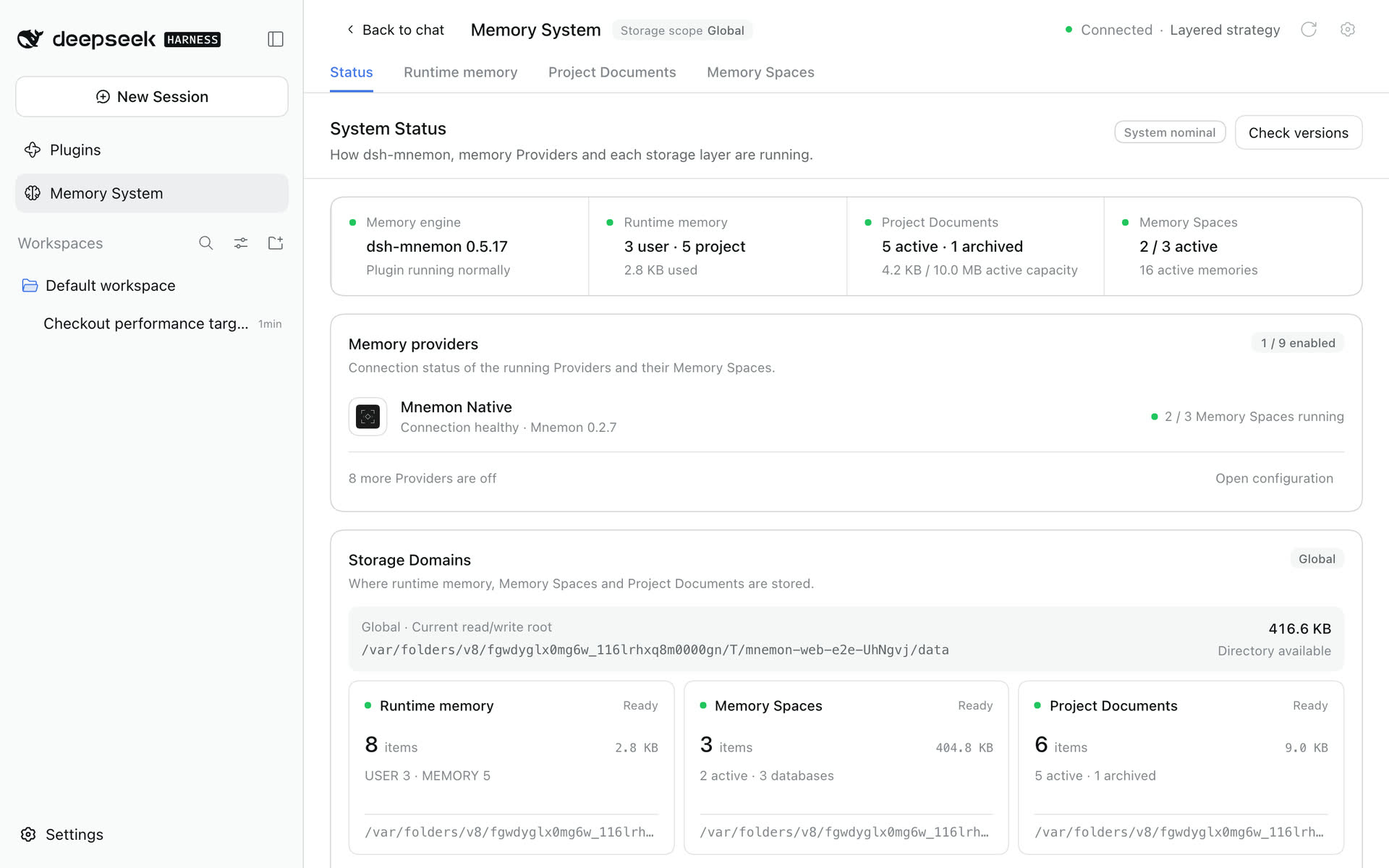
Check that:
- the header says Connected and names the main strategy, Layered strategy by default;
- the engine card shows the dsh-mnemon version, and the Mnemon CLI appears under Memory providers if you installed it;
- Runtime memory, Project Documents and Memory Spaces each have a card without errors;
- the storage root matches your storage scope.
Project Documents needs a DSH workspace even with global storage. Select a workspace for the conversation; "Waiting for workspace" means the project context is missing, not the CLI. If the Mnemon CLI is missing, run command -v mnemon and mnemon --version on macOS or Linux, or Get-Command mnemon on Windows. See troubleshooting for other symptoms.
3. Store your first memories
Runtime memory. Open Runtime memory, choose Add memory and save a preference in the user profile or a project fact in working memory. It is injected into every later turn.
A document. Open Project Documents, choose New document and save a short design note or checklist. The Agent searches documents when a question needs them.
A memory space. Open Memory Spaces → Overview and choose Create Memory Space:
- Pick a Provider. Mnemon Native, the local default, is offered once its CLI is installed; enable third-party Providers on Memory Spaces' page first.
- Give it a narrow name, such as Project decisions, and describe what belongs there.
- Keep it active so conversations can read it.
In an empty storage root, the first Mnemon Native space uses Mnemon's default store id while keeping your name and description; spaces on other Providers get their own ids. Then choose Save to memory, enter something stable and secret-free, and choose Send to task Agent. An independent task Agent picks the space, removes duplicates and writes, and its receipt says where it went.
Check it. Open Memory Spaces → Recall, ask a concrete question and choose Direct search. Each result keeps its memory space, category, importance and score; copy its id when you need it.
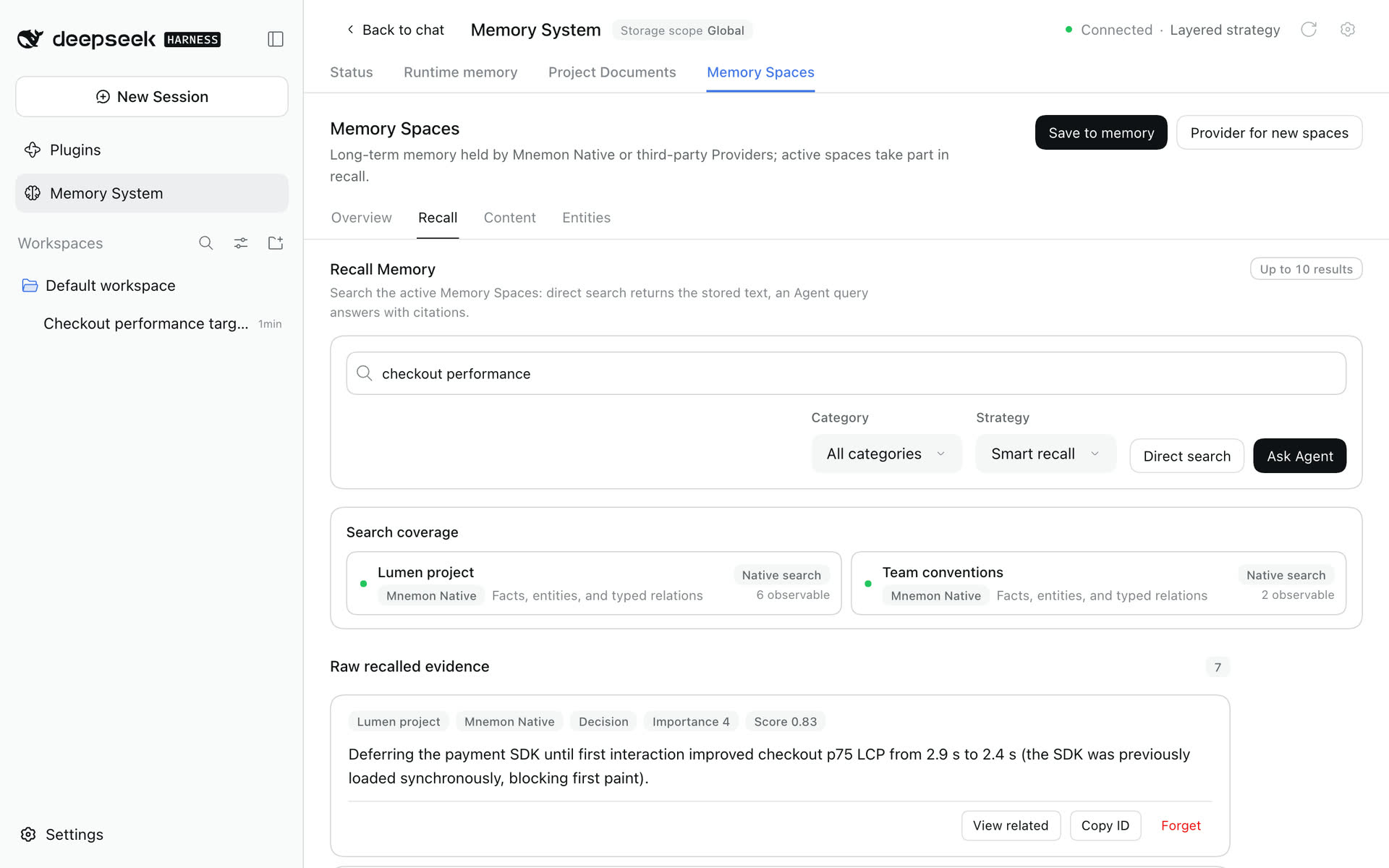
You can also use conversation commands:
/mnemon status
/mnemon recall <focused query>4. Use memory in a conversation
Ask a question that depends on what you stored, and let the Agent decide whether it needs memory. After the reply:
- a Turn memory line appears if the turn used memory; expand it to see the documents and memories each tool read or wrote, and select one to open it where it lives;
- the brain mark under the reply is Save to memory: it opens an editable dialog, Cancel writes nothing, and sending it to the task Agent returns a receipt.
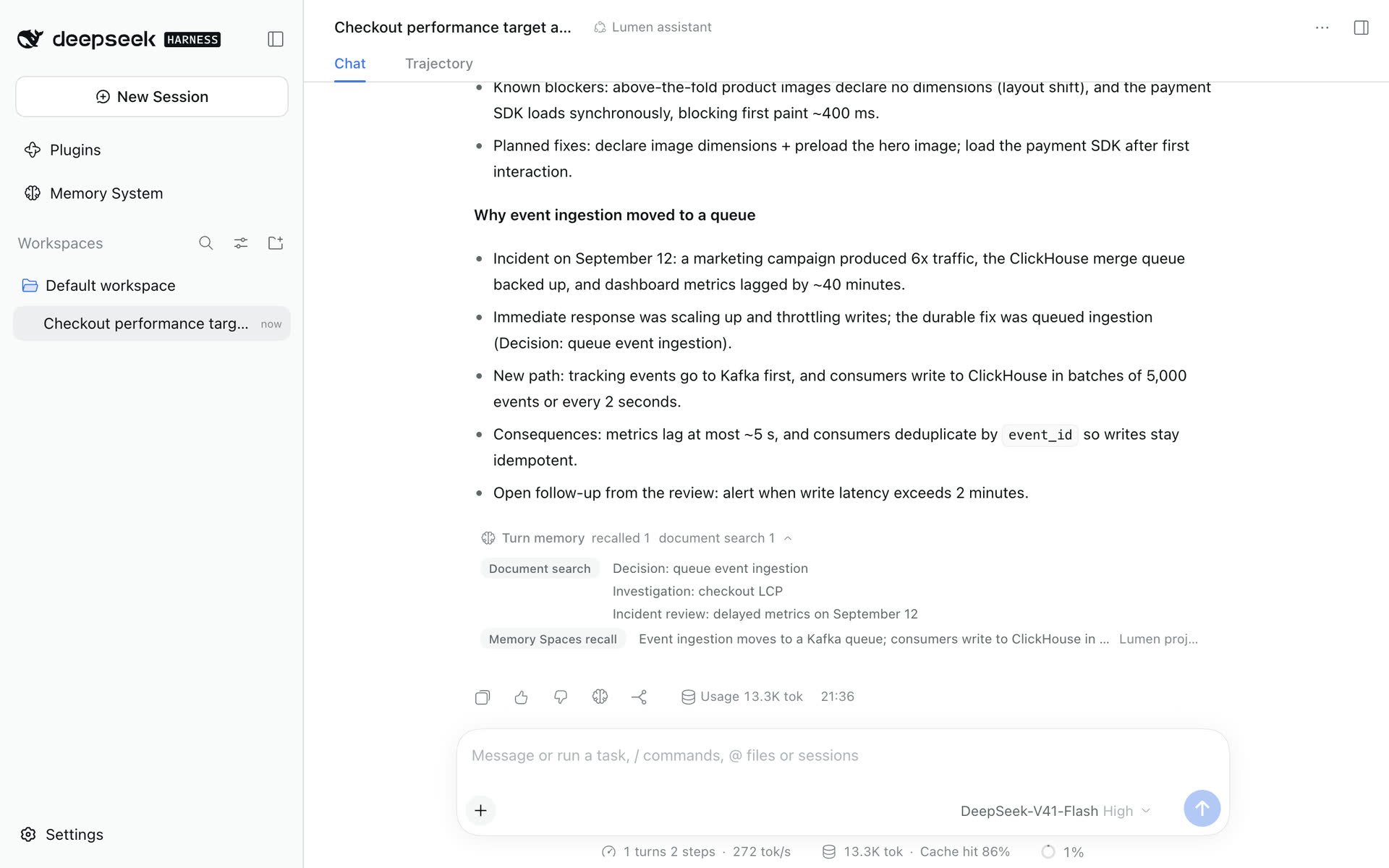
Ordinary conversation does not force recall. Current requests, repository files and live tool results outrank remembered history.
5. Choose how memory is composed
Open Plugins → dsh-mnemon, or the gear in the Memory System header.
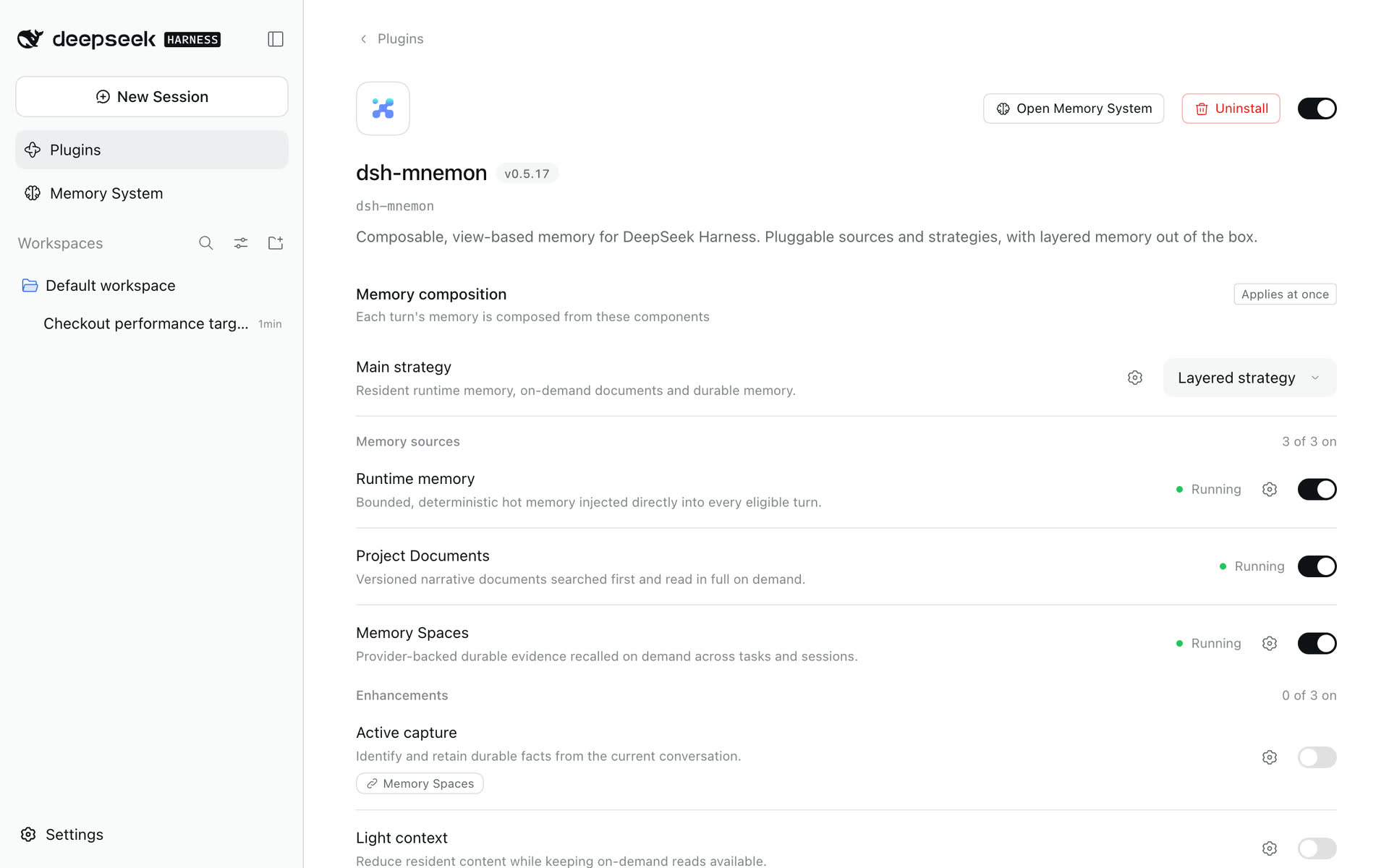
- Main strategy: keep the Layered strategy, or choose the General strategy to offer every available source in one budget and let the model decide.
- Memory sources: Runtime memory, Project Documents and Memory Spaces, one switch each. Turning one off stops its context, tools and background work without deleting data.
- Enhancements: Active capture, Light context and Scoped composition are off by default; each works with either main strategy.
- Storage: Global (default) shares one directory; Workspace keeps each workspace's own
.mnemon; Centralized keeps each workspace under one root. Data directory is Default or Custom. Changing either never moves existing data. - Interface: open the Memory System in the sidebar or as a conversation tab, and turn the conversation controls on or off.
Switches and selectors apply at once; storage changes wait for Apply. The UI guide covers every page, and Configuration lists the settings behind them.
6. Next steps
- Learn every page in the UI guide.
- Decide what belongs in runtime memory, documents or memory spaces with the storage model.
- Export your first ZIP backup and prepare for upgrades with the operations guide.
- Connect a long-term backend with the Provider guide.