Operations, security and troubleshooting
Health checks
Open Status in the Memory System. If you use Mnemon Native, also check its binary; the other Providers do not need it:
command -v mnemon
mnemon --version
Windows PowerShell:
Get-Command mnemon -ErrorAction SilentlyContinue
Test-Path "$env:LOCALAPPDATA\Programs\mnemon\mnemon.exe"/mnemon status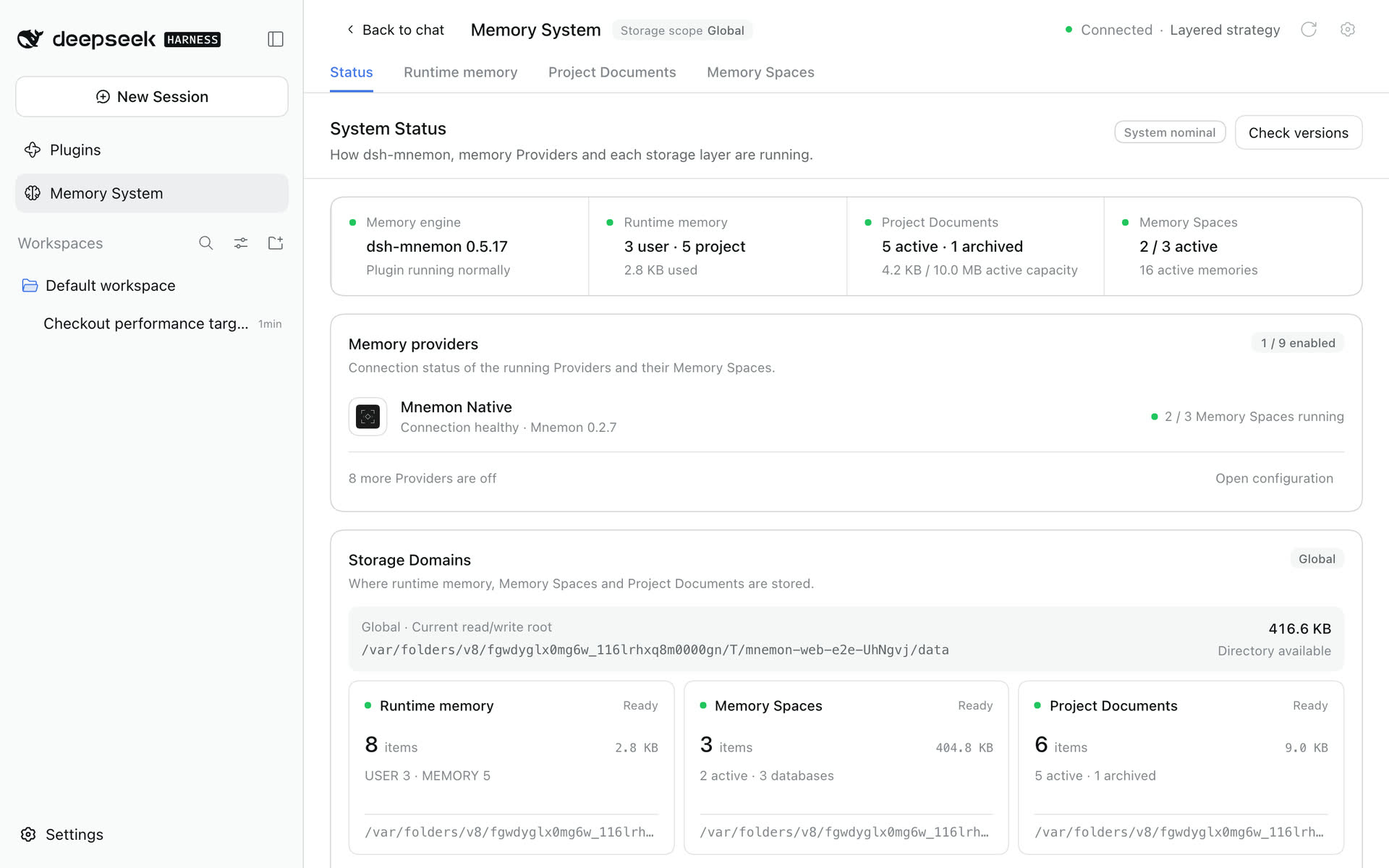
Status shows the dsh-mnemon and Mnemon versions, one card per memory component, the Providers and the effective directories. mnemon status opens the effective Store and may initialize data or run upstream migrations, so it is not a completely side-effect-free probe.
If OpenViking reports /api/v1/admin/* access restrictions, configure User key owner (skip admin) (discoveryUser), the account identifier, endpoint and user API key on Memory Spaces' page under Plugins → dsh-mnemon. This verifies access to the selected memory root using the data API; a denied or missing root keeps the previous configuration. It does not prove write permission or change the identity bound to the key. Leave the field empty for admin discovery. See Provider boundaries and downgrade steps.
Version checks and updates
Check versions on Status opens the version panel:
- dsh-mnemon: installed is the version the owning Profile records (Status shows the version that runs); updates from npm
latest. An installed beta/alpha/rc also checks its own channel and can graduate to a newer stable version. Stable users never opt into prereleases automatically. - Mnemon CLI: installed from
mnemon --version; latest from the official@mnemon-dev/mnemonnpm package. Only Mnemon Native needs it, so a missing CLI shows as optional with its install command.
Checking is read-only and never installs automatically. Update appears only when a newer version exists and the source is safely recognized. Mnemon supports the official npm launcher, Homebrew Cask / Formula, and go install; dsh-mnemon supports npm installations in the owning DSH Profile. link: / file: development builds and unrecognized manual installs show guidance only.
dsh-mnemon updates through DSH's own plugin installer, as dsh plugin add dsh-mnemon@<version> would, and so does an optional Strategy the Profile added on its own. The installer uses the Profile's package manager, which in the desktop app is the app's bundled pnpm, so no pnpm is needed on PATH. It follows the Profile's registry settings and fallbacks and waits for the Profile's lock. Before keeping the new version, DSH checks the DSH versions it supports. A failed install restores the Profile's package.json and lockfile, the dialog shows pnpm's error line with DSH's log path, and the enabled plugins stay as they were; files the install downloaded can stay, and Check versions keeps showing the version the Profile records. Through DSH's installer the Host updates only the Profile it runs in. Where DSH offers no plugin installer, the Host runs pnpm from PATH in the owning Profile. With neither the app's pnpm nor one on PATH, the dialog asks you to install pnpm and restart DSH. dsh-mnemon 0.5.21 and earlier only know the pnpm route: in the desktop app, update from those versions once by removing dsh-mnemon on the Plugins page and adding it again, which keeps your memory data.
npm updates require the active launcher to belong to the global root reported by the current npm. A different Node/npm installation or a broken launcher shows repair guidance instead. Use npm install --global @mnemon-dev/mnemon@latest to install or migrate, then mnemon update for later updates. The commands run on the DSH Host and need Node.js 22+. After changing PATH or a CLI override, recheck the executable path shown in the dialog.
On Windows desktop Hosts, memory operations and version checks use the native binary pinned by a recognized official Mnemon npm installation directly. This avoids the npm launcher's additional console window while retaining hidden subprocesses, timeouts, cancellation, and saved embedding settings. The displayed installation path and npm update ownership still refer to the original launcher. Unknown package layouts or missing native dependencies retain the launcher fallback and its repair diagnostics.
Expand dsh-mnemon's subpackage list to inspect Sources, Strategies, and Providers. Starter pins update with the Starter. Only independently installed packages in the owning Profile can update individually; source links are preserved. Package writes are serialized, and restart reminders survive subsequent checks and reopening the dialog. Read-only connections retain checks and command copying; page updates require management authority and writeEnabled.
Go updates additionally require the active executable to resolve to the current Go installation output (GOBIN, or the first GOPATH entry's bin directory), with no cross-compilation target. A downloaded binary is not a Go-managed installation merely because it contains Go build metadata. CLI updates must verify that the active executable actually reaches the checked release before reporting success.
The Host fixes update commands and arguments. The browser cannot supply either; shell is disabled and execution/output are bounded. A plugin update installs the exact checked version in its owning profile and verifies the installed package before reporting success; pinned beta versions cannot silently remain on an older release. After an update, the UI rechecks both components and refreshes Status automatically. Mnemon applies on the next CLI call. dsh-mnemon loads once DSH restarts: stop and rerun dsh web, or quit the desktop app completely (Cmd+Q on macOS) and reopen it. Until then the Host keeps running the previous version, while DSH loads the new Memory System page as soon as the files change; that page reopens Check versions with the update and the restart it needs. Until DSH restarts, a notice above every Memory System page names the installed version and the one that still runs, whether the update came from Check versions or dsh plugin; packages updated on their own are named too. Status shows the running version, and Check versions the installed one, so it does not offer that update again.
Legacy Session recovery
DSH 0.1.7-rc.2 and 0.2.0-rc.2 are the supported hosts; see the compatibility matrix. Restart the Web Profile after upgrading Mnemon: the Starter patch gives the owning connection entry both webRuntime and webServer. This restores all seven Mnemon RPC channels when Memory System or its configuration page previously returned HTTP 405. Custom profiles that install the Host without the Starter must apply the same dependency declaration to their connection entry, preserving any additional dependencies in their own composition. No DSH package source is changed; browser authentication and Mnemon grants still apply.
The separate error source summary requires notice form; source v0 artifact remains unchanged comes from older Mnemon messages in DSH Session logs. New recall/instruction messages omit that invalid summary. Updating the plugin does not rewrite an existing Session. To repair one affected log:
- Stop the owning DSH process. Back up its entire Session storage root, including every generation, separately from a Mnemon Pack. Use the exact
raw logpath reported by DSH; do not search or rewrite unrelated sessions. - With the updated Mnemon package installed, preview the command below against a backup copy. Use Node
22.19+or24+for.jsonl.zstd; plain.jsonlalso works on Node 20. - Write to a new path outside the Session directory. Review
repairedMessages,repairedDescriptors,expandedToolChunkRows,expandedToolChunks, the SHA-256 report andblockers. Preview counts describe candidate changes. Known unsupported shapes cause exit status 1; a requested copy hasmode: "refused"and no output is published. Existing output files are rejected. - In a disposable copy of the Profile, replace only the affected
session.jsonlorsession.jsonl.zstdwith the repaired copy, retaining the original backup. Let DSH load and resume it, then restart and verify the conversation. Repeat that explicit replacement in the stopped original Profile only after validating the copy. The command itself never replaces the input or a live Session.
dsh-mnemon-repair-session --input /backup/session.jsonl.zstd
dsh-mnemon-repair-session --input /backup/session.jsonl.zstd --output /backup/repaired-session.jsonl.zstd
The executable is installed with dsh-mnemon; a Profile-local installation can use pnpm exec dsh-mnemon-repair-session from that Profile. In a checkout use node bin/repair-legacy-session.mjs. The two stream normalizations below preserve IDs themselves; a proven identity recovery can also apply to the same log. The copy repair supports these audited historical shapes:
| Historical shape | Copy behavior |
|---|---|
dsh-mnemon instructions summary Optional memory recall and remember reminder; recall summary Memory View snapshot or Runtime memory snapshot |
Remove only that source's summary member. Other plugin messages and unfamiliar summaries remain untouched. |
| Exact historical subagent descriptor v2 with a composition accepted by the frozen v3 contract | Change only its version value to 3. Keep provider, model pair, persona, label and tool filters intact; add no defaults or reasoning effort. Extra fields, unpaired models and unsupported versions are refused. |
Exact packed tool-call-chunks with string id: "" or name: "" |
Expand to the original raw delta events, preserving IDs, name presence, argument strings, sequence numbers and timestamps. No chunk is dropped and provenance references need no renumbering. Already raw empty-string deltas remain byte-identical. |
Exact raw or packed tool deltas with an own name: null member |
Keep the member and change its value to ""; expand packed rows with the same logical sequence and timing. IDs, arguments and durable messages remain intact. Both values leave assembly unchanged, and keeping the member preserves token timing. normalizedToolChunkNames counts affected logical deltas. |
A completed deepseek-official stream recorded a unique nonempty provider ID before empty continuation IDs corrupted its durable tool chain |
Restore that existing ID only after checking exact ordered chunk provenance, indexed block assembly, matching name/arguments and a unique call/result association. Preserve placeholders before the first candidate, message UUIDs, payloads and other plugin content. Independently proven multiple calls and text/reasoning blocks are supported. No ID is generated. |
| No recorded ID, conflicting identities, interruptions, unknown affected owner shapes or unaccounted approval/dispatch/plugin/copy references | Report blockers and refuse output. Arbitrary empty-ID histories and owner replay state need recovery by their original writer. |
The ID check uses the original stream's complete sourceEventSeqs, including packed logical members. Result provenance must select its exact call; if absent, only a unique single-call step with no other attempt qualifies. An explicit wrong reference never uses that fallback. Extra references through sequence numbers or message IDs are checked across step boundaries; ordinary compaction sequence references and unrelated plugins can remain unchanged. recoveredToolIdentityChains counts restored chains, recoveredToolIdentityFields counts logical identity slots, and toolIdentityRecoveryRefusals explains unsupported proofs with bounded location samples.
The tool accepts only v0, valid UTF-8 JSON records and complete ordinary Zstandard frames, with a 128 MiB limit on stored input, decoded input and expanded output. Malformed input, incomplete frames, ambiguous duplicate keys on transformed or identity-proof paths, and unsafe delta coordinates are refused without publishing output. Only the changed summary/version/name/identity members and expanded packed rows are rewritten; every other decoded byte is retained. Diagnostics count every known blocker and include at most ten line/event/path samples per class, without message bodies. migrationValidated: false is deliberate: this scanner does not recover unrelated corruption or guarantee that every Session can migrate. The installed official DSH loader and stream replay remain the final checks. See the issue #251 contract audit and verification.
DSH migrates old Sessions to immutable v3 generations when opening for write. Mnemon Runtime, Documents and Memory Spaces retain their existing formats. To roll DSH back, restore the pre-upgrade Session backup in a separate old-version Profile; do not open v3 generations with an older DSH. See verification and screenshots.
Backup and recovery
Recommended: ZIP from the plugin page
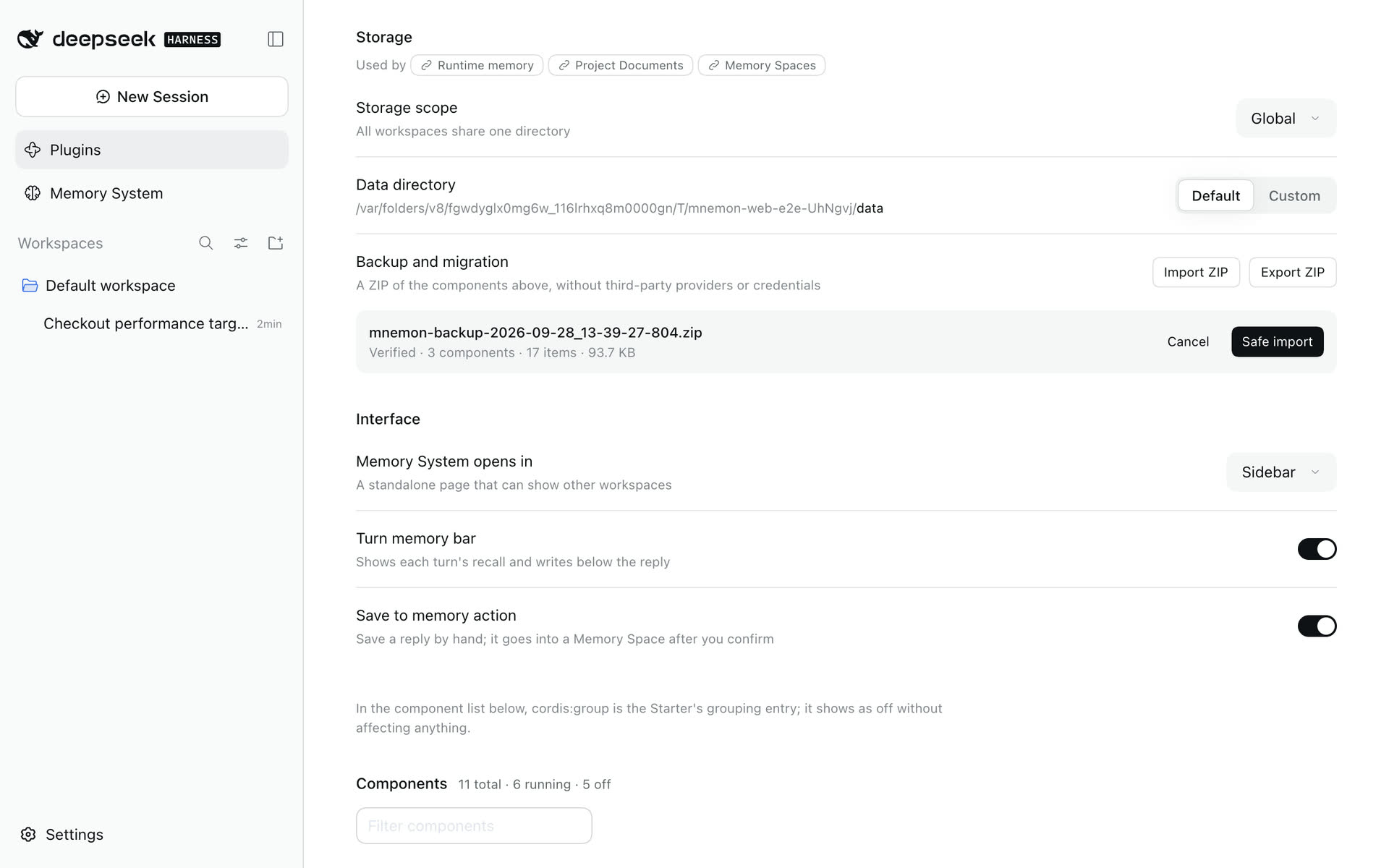
Storage → Backup and migration on the dsh-mnemon page under Plugins operates on the currently effective root:
- Export ZIP includes Runtime, Documents, and every Mnemon Native Memory Space. Third-party connections, local external stores, and remote data are excluded.
- Import ZIP previews, validates, then merges into the effective root.
- Packs include
manifest.json, SHA-256 inventory, and component summaries. - Export/import hold component locks; a Memory Space with an uncheckpointed WAL is rejected.
- Import checks paths, counts, compressed/expanded limits, JSON schemas, Document hashes, registry consistency, and SQLite headers.
- Merge is staged before replacing component directories; commit failure restores pre-import directories.
The UI offers safe merge, not “overwrite everything”:
- Runtime deduplicates by target and content.
- Identical Document ID + hash is skipped; conflicting content receives a new ID.
- Identical Memory Space ID + database is skipped; conflicting content receives a new ID.
Import is governed by writeEnabled and is rejected in read-only deployments. A ZIP contains private memory—encrypt it, restrict access, and rehearse recovery. Provider credentials live in state/memory-providers.json with mode 0600; they are excluded from ZIP. Saved credential values are not returned through management responses either. Protect the entire state/ directory in the offline snapshot below if connections must be backed up.
Recovery rehearsal
- Under Storage, set Data directory to Custom, enter an isolated directory and apply.
- Confirm the current read/write root on Status is that directory.
- Select the backup under Backup and migration, review its preview, then import.
- Check Runtime, Documents, Memory Spaces, and directories on Status.
- Run one focused direct recall and read one Document.
- Only after verification decide whether to switch a production scope.
Never restore directly into the only production root without another backup.
Filesystem snapshot
To preserve reserved state or take an offline complete snapshot, stop every DSH / Mnemon process using the root and copy:
<storageRoot>/runtime
<storageRoot>/documents
<storageRoot>/data
<storageRoot>/state    # when present; outside the built-in Pack's three data components
Generate an inventory or checksums and rehearse recovery in isolation. A normal directory copy while writers are running is not a consistent snapshot.
Changing storage scope
Saving global / workspace / custom / workspaces initializes a new runtime graph before switching atomically. The page reloads automatically, but data is not migrated:
old scope -- save --> new empty or existing root

no automatic copy
no automatic merge
no automatic delete
Recommended migration: export from the old scope → switch and confirm the new root → import → verify. In Workspace mode, confirm both inspection and execution targets.
With workspaces, back up the complete central directory for every workspace, or export a Pack for the selected workspace only. A renamed/moved workspace receives a new path hash; restoring its old data is an explicit operator action.
Existing turns and delegated child activations may still use the old runtime. Wait for them to finish or cancel them before moving or retiring its data. Parent completion alone does not release an asynchronous child's delegation; a newly created or cold-resumed activation captures its own authorized generation.
Cloud-hosted WebUI
DSH 0.1.7-rc.2 and 0.2.0-rc.2 are the supported registry targets. It authenticates the page, every RPC, and every stream through an authority-bound browser session created from the launch-token URL printed by the Host. --trusted-host remains a Host/Origin fence; it does not replace HTTPS or deployment access controls.
Terminate HTTPS at a reverse proxy or access gateway and protect the public entry for its intended users. Proxy the same-origin
/and/apitraffic, including streams, tohttp://127.0.0.1:3080while preserving the externalHostauthority.Start the loopback service with the external authority. Use a bare
host[:port], not a URL:shdsh web --trusted-host memory.example.com --no-openFor a non-default public port, use the exact authority, for example
memory.example.com:8443. DSH deliberately rejects--host 0.0.0.0; keep the service on loopback and let the proxy or an SSH tunnel reach it.For a browser that does not already have a valid cookie for this public authority, use the launch-token URL printed as
dsh web: .... With a reverse proxy, replace only the printed loopback origin with the public HTTPS origin and preserve the/path and?token=...query. For example, transformhttp://127.0.0.1:3080/?token=...intohttps://memory.example.com/?token=.... Treat that URL as a credential and do not put it in logs, tickets, or chat. DSH exchanges it for an HttpOnly, SameSite cookie and redirects to a clean/; a still-valid authority-bound cookie can survive a Host restart.Open the clean external URL and verify that Status and the
dsh-mnemonpage under Plugins both load and a page reload remains authenticated. Remote settings are read-only by default. If management is intended, apply the explicit remote management grant, restart DSH, then verify one deliberate small save.
An HTTP 403 can indicate a Host/Origin mismatch or an old remote Client still using standalone channels: check --trusted-host, the public authority and proxy routing, then upgrade dsh-mnemon, restart DSH and reload the browser. Remote Mnemon calls use the authenticated API Gateway. An HTTP 401 requires restoring the Host's browser authentication or pairing. A response saying remote management requires remoteAccess: trusted-host is a separate Mnemon grant check; successful browser authentication alone does not authorize management.
Disable the complete Starter
The legacy mnemon Entry remains the lifecycle switch for the complete Starter. To disable Mnemon without leaving its Source or Strategy Entries waiting on the missing Host service, add this profile patch and restart DSH:
- id: mnemon
  disabled: true
This disables the Core/Host, all three bundled Sources, both main Strategies, and all three optional Strategy enhancements together. It does not remove installed packages or delete memory data. Remove the override, or change it to false, and restart DSH to enable the Starter again.
Remote management
For authenticated remote clients, remoteAccess: trusted-host grants management operations; remote reads and narrow activation do not need it. Without it, a remote page's Memory System and plugin settings say why they are read only. A browser on the same computer and DSH desktop windows are not remote clients and do not need it. Configure management only for the intended authenticated users. To run an older DSH, keep the Mnemon release verified with it and its pre-upgrade Session backup; see the compatibility matrix.
Open
~/.dsh/profiles/web/cordis.patch.yml, or$DSH_HOME/profiles/web/cordis.patch.ymlwhenDSH_HOMEis set. Edit an existing top-level- id: mnemonentry instead of adding a duplicate. If the initialized file still ends in[], replace that marker with the complete row below; otherwise append the row to the existing top-level YAML list:yaml- id: mnemon config: routingGuidance: true lifecycleEnabled: true recallMode: guided writebackMode: guided idleReviewMs: 30000 tabEnabled: true writeEnabled: true remoteAccess: trusted-host timeoutMs: 10000 defaultRecallLimit: 10 embedding: enabled: false endpoint: http://localhost:11434 model: nomic-embed-text recallQuality: policy: strict-v1 lowScoreThreshold: 0.25 highScoreThreshold: 0.6 candidateMultiplier: 3 maxMediumResults: 4 maxUnknownResults: 2A profile patch replaces the targeted row's complete
configinstead of deep-merging one field. Preserve existing customizations, and compare it withdsh web --dump-default-configafter a plugin upgrade so new bundled defaults are not masked.Inspect the effective tree with
dsh web --dump-config. Confirm that the finalmnemonrow containsremoteAccess: trusted-hostand that stderr reports no unmatchedmnemontarget.Start DSH with the same
--trusted-hostcommand, and restart after anyremoteAccesschange because Mnemon captures that policy at startup. Verify Status, settings loading, and one deliberate small save through the authenticated remote connection.
Security boundaries
Process
- CLI uses
spawn(command, args, { shell: false }). - stdout + stderr are capped at 2 MiB per call. Mnemon Native reads a whole Memory Space for its contents list, its graph and the exact-content check before runtime memory archives entries; those reads grow with the Store and are capped at 128 MiB.
- A call that fails says why: only a failed launch suggests installing Mnemon or setting
mnemon.cliPath, while a timeout, a cancellation and an output over the cap each name themselves. - Calls use
timeoutMsand AbortSignal; cancellation sendsSIGTERM, thenSIGKILLafter 1.5 seconds. - One Runner serializes calls; separate DSH processes still rely on Mnemon / SQLite concurrency.
Files
- Runtime, Documents, and Pack operations use in-process queues or component locks.
- Lock wait defaults to 5 seconds; stale threshold is 30 seconds.
- Writes use temporary files, staging, and rename.
- Runtime revisions block stale compaction; Document revisions block movement of updated originals.
sourcePathscannot escape the initiating workspace or point into managed Documents.
Web and model
- DSH owns authentication or pairing for remote RPCs and streams. Mnemon's API Gateway projection additionally requires
remoteAccess: trusted-hostfor management; local loopback clients and DSH desktop windows (dsh-app://app/) use their own channels. - Provider catalogs and management responses are redacted; the UI receives configured field names, never saved credential values.
- The WebUI follows the Host's writable settings snapshot instead of inferring capability from transport locality; an unavailable settings channel renders an explicit diagnostic rather than an empty page.
- The WebUI neither reads SQLite, starts processes, calls remote providers, nor supplies arbitrary update commands; provider network access remains inside the Host.
- Workers use persona, tool allowlists, and
maxDepth: 1. A stable result tool accepts only the current child's revocable request ID and validates each operation's result schema. - Distillation and supervised writeback workers cannot call
mnemon_forget. Idle review has only the create-only Documents tool for document writes, so it cannot replace user originals or archive documents to make room. These restrictions are enabled by default and do not require an enhancement plugin. - Idle review writes each pass to one layer: after it creates a Document, working-memory changes are refused, and after a working-memory change, a Document is refused.
idleReview.runtimeMemory: falseremoves its runtime memory tool entirely. - Queries, candidates, Document bodies, and historical memory are treated as untrusted data.
These boundaries are not a secret scanner. There is no deterministic credential detection; never submit keys, tokens, private keys, or raw sensitive logs.
Security reporting
Report vulnerabilities privately through SECURITY.md, not a public issue. Data loss, path traversal, lock/revision bypasses, subagent-isolation breaks, and injection through rendered memory are in scope.
Troubleshooting
mnemon.cliPath accepts an explicit path or a command name resolved against the Host's PATH. If the binary is installed or restored into an existing search directory while DSH is running, choose Refresh in the Memory System header to update availability without restarting. Changes to the Host process's environment still require a restart. Status and version checks resolve the same configured command.
| Symptom | Check and resolution |
|---|---|
Plugin details show the mnemon-bundle container row (named dsh-mnemon/bundle from 0.5.20, cordis:group before) as off, and its switch returns unknown-plugin |
Known container-display issue in DSH 0.1.7-rc.2 (0.2.0-rc.1 shows it as off too). Check Memory System → Status and the actual components; continue using Mnemon if they and memory operations work. Use the top-level bundle or mnemon core component switch for the composition; do not reset data or remove the group. See cause, handling and fix boundaries and upstream #649. |
| Terminal flashes when switching conversations on Windows | Update the Starter, or Runtime Source if independently installed, then restart the DSH Host. Runtime Git branch detection hides its console window; Git failures, timeouts and detached HEAD still fall back to an unfiltered Runtime view. |
| Mnemon unavailable | macOS/Linux: run command -v mnemon, mnemon --version. Windows PowerShell: run Get-Command mnemon, Test-Path "$env:LOCALAPPDATA\Programs\mnemon\mnemon.exe". Set MNEMON_CLI_PATH or mnemon.cliPath, then restart |
| Electron desktop Host cannot run npm CLI scripts | Verified npm launchers use child-only ELECTRON_RUN_AS_NODE=1. If the desktop shell disables the Electron runAsNode fuse, this flag is ignored; set mnemon.cliPath to the official native binary (mnemon.exe on Windows). Automatic npm updates still require a Host that can run the JavaScript launcher |
| Headless Agent has no Mnemon tools | Plugins are profile-local. Run dsh plugin --profile headless add dsh-mnemon; a Web-profile installation does not carry over |
| Memory System entry missing | Check tabEnabled=true; displayMode=sidebar uses the sidebar, while displayMode=builtin uses the open conversation's tabs. For a local link run pnpm run build, then restart the profile |
An old buildin preference opens a conversation tab |
It is saved as builtin; choose Sidebar under Interface to keep the standalone entry. Memory scope and stored data are unchanged |
| Status healthy but recall empty | Check active spaces, storage scope, inspected root, effective session root, and query focus |
| Header reports misalignment | Confirm that the inspected workspace is intended. Workbench tasks execute there; conversation tools retain their own session scope |
| A setting appears unchanged | Switches and selectors apply at once; typed values need Apply. A failed write shows its reason beside the control and restores the saved value |
| Custom directory rejected | Use an absolute path, ~, or ~/... |
memoryBodyId is required... |
Active count is not exactly one; select a target explicitly |
memory space is not active for reading |
Activate it in Overview; inactive writes are allowed, reads are not |
| Provider error | Review needs guarded local child publication; use bounded spawn or opt-in fork. With DSH/Teams 0.1.7-rc.2, opt into idleReview.agentTeams: scoped; pause stays the default. Inspect partial-write receipts before retrying |
Background review fails with no user query found in messages on a local model, such as Qwen3.x on Ollama |
Once tool results filled the model's context window, Ollama's truncation dropped the subagent's prompt. From 0.5.22, Mnemon adds a short user turn to a refused subagent step and retries it (#327); update dsh-mnemon. A larger Ollama context length (OLLAMA_CONTEXT_LENGTH or the model's num_ctx) also avoids the truncation. The review may have created a Document before it failed; check the partial-write receipts |
| Runtime replace exceeds capacity | Shorten it or organize first; automatic maintenance handles add overflow only |
| Document source path rejected | Keep it inside the session workspace and outside managed Documents |
| CLI timeout | Increase timeoutMs; large Stores may need more than 10 seconds for status or graph |
| Lock timeout | Check other writers; never delete a lock owned by a live process |
| ZIP export reports WAL busy | Wait for Memory Space writes to settle; do not bypass the uncheckpointed-WAL guard |
| ZIP import checksum/schema failure | The backup is damaged or incompatible; preserve the current root and never unzip over it manually |
| No Update button | Already current, remote check failed, or the source is link/manual; follow panel guidance |
| An authenticated remote page can read or activate a Memory Space but cannot save settings or perform other writes | Default management restriction; for intended remote management, preserve the current configuration, set remoteAccess: trusted-host locally, and restart DSH |
| In the DSH desktop app, runtime memory, Memory Spaces and the plugin settings are read only while agent tools still write | dsh-mnemon 0.5.18 and earlier treated desktop windows as remote pages (#310); update to 0.5.19 or later on the app's Plugins page, with no remoteAccess change |
| DSH 0.2 reports dsh-mnemon as incompatible when installing or starting | A release before 0.5.19 was installed; update dsh-mnemon, and within 24 hours of a release install the versioned package as Install and start describes |
After dsh-mnemon was updated while DSH ran, enabling a component reports ERR_PACKAGE_PATH_NOT_EXPORTED (Package subpath './starter' or './bundle') |
The running process still loads with the old version's package information; quit DSH completely and start it again (Cmd+Q for the desktop app). On 0.5.18 or 0.5.19, do not turn off dsh-mnemon/starter; see Install and start |
mnemon-bundle (cordis:group): pending (waiting for service: mnemonStarterReady), or the desktop app fails to start and shows its plugin recovery page |
dsh-mnemon/starter of 0.5.18 or 0.5.19 is off; turn it on under Plugins → dsh-mnemon, or update to 0.5.20, which has no separate readiness switch. On the desktop app, remove the plugin from the recovery page and add dsh-mnemon again; see Install and start |
mnemon-bundle (dsh-mnemon/bundle): pending (waiting for service: mnemonStarterReady) right after an update |
DSH was updated to 0.5.20 without a restart and still runs the old component group; quit DSH completely and start it again, as Install and start describes |
| Mnemon RPC returns 401 after a DSH restart or authority change | Open the launch URL printed by dsh web so the one-time token can establish a fresh authority-bound browser cookie |
Known limitations
Feature read-only is not disk read-only
writeEnabled=false disables semantic mutation and Pack import, but startup may initialize/repair Runtime, Document search updates lastAccessedAt, and Mnemon reads may migrate a database.
Shared Documents scope
global and custom can share one Document index across workspaces; records have no independent workspace-ownership field. sourcePaths are checked against the initiating cwd only when written.
Cross-system transactions
Cold-index-first protects active content but is not a rollback-capable distributed transaction across Mnemon SQLite and the filesystem. A revision conflict after indexing may leave a duplicate reference; the system preserves data.
Background watermark
Activity score, latest checkpoint, and retry state are not persisted. Host restart clears unprocessed activity. Failure backoff, circuit breaking, and manual retry are not implemented yet.
Versions and internationalization
DSH 0.1.7-rc.2 and 0.2.0-rc.2 are supported; see the compatibility matrix. The Web interface is bilingual, while commands, tool cards, compatibility metadata and some errors remain partly untranslated.
Document archive recovery
Document archive no longer asks the worker to number remember/recall receipts. If an older attempt left a cold index while the document stayed active, retrying can reuse an index whose exact path and content hash match the current revision. Updated documents need a matching new revision index. Providers with asynchronous extraction or no safe forget are rejected before indexing. When no Memory Space at all can take the index, the Document is archived locally without one: its original moves to the archive and stays readable on the Project Documents page. A cleanup failure names the destination and newly created id; keep existing data until the outcome is established.
Runtime archive recovery
Capacity archival writes to an active Memory Space whose Provider supports exact writes and safe forget. Asynchronous extraction targets, including Hindsight, are excluded before any archive write. When no Memory Space at all can take the archive, because the layer is off or takes no automatic writes, no Provider is ready, no space is active or only unsupported Providers remain, the Runtime Source appends the entries compaction leaves out to its local archive in runtime/archived/, under the same lock and just before it commits the compaction and the pending write: MEMORY.md to read and memories.jsonl with each entry's metadata. A space that another Memory Spaces Source could take it into, or a Runtime Source too old to keep what compaction leaves out, still refuses. Mnemon Packs do not carry the local archive, and importing one keeps it. Direct Provider writes retain their existing asynchronous behavior.
Conversation archival uses the selected Source's write scope: known spaces activated during the turn and spaces created by that View can receive the archive. A space created elsewhere after the View was pinned requires a new turn, so a write whose only eligible spaces lie outside the View's scope, or that the View offers no writes to, is refused rather than archived locally. An empty scope never grants access to every space. Destination errors distinguish an empty directory, an empty or excluding View scope, and unsupported Provider capabilities, and report the catalog, authorized and writable counts. The pending add has not been saved on failure; retry the same tool input in a new turn after correcting the reported cause. Existing hot entries are preserved.
If an archive receipt or local commit fails, the Host attempts to forget only entries proven newly created by this attempt. Skipped or reused entries are preserved. A changed or unreadable Runtime revision after a commit error is treated as uncertain: archive entries are retained to avoid losing committed memory. Cleanup errors identify the remaining destination and item ids. A Provider request that fails without receipts may have an unknown remote outcome, so this is not a distributed transaction; inspect that Provider before retrying.